
Interactive electronics resource
4017 Light Chaser SMD Instructions
Build, understand and experiment with the 4017 Light Chaser SMD. This resource brings the original kit material into the current MitchElectronics format with the schematic, circuit explanation, component and PCB information, construction guidance, troubleshooting and practical ideas where available.
Introduction
What is the 4017 Light Chaser SMD Trainer?
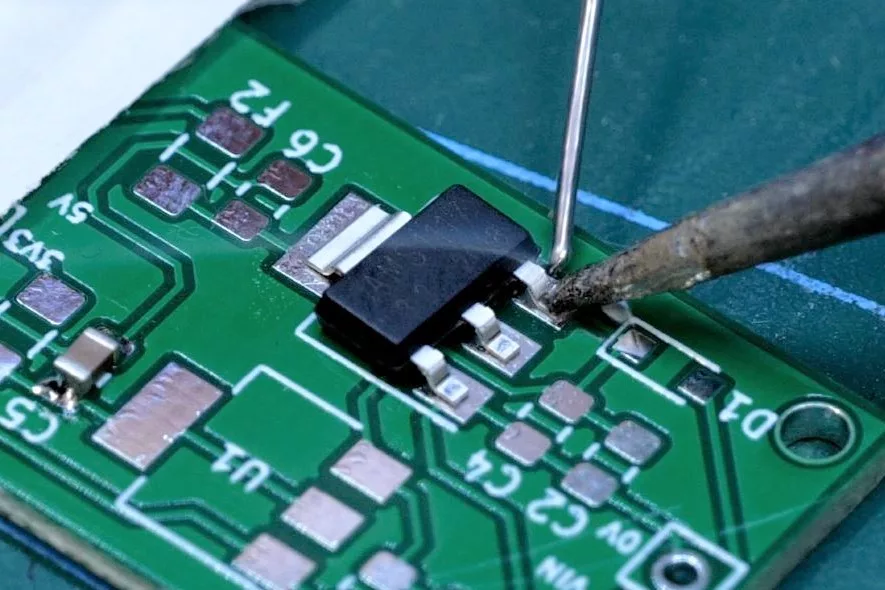
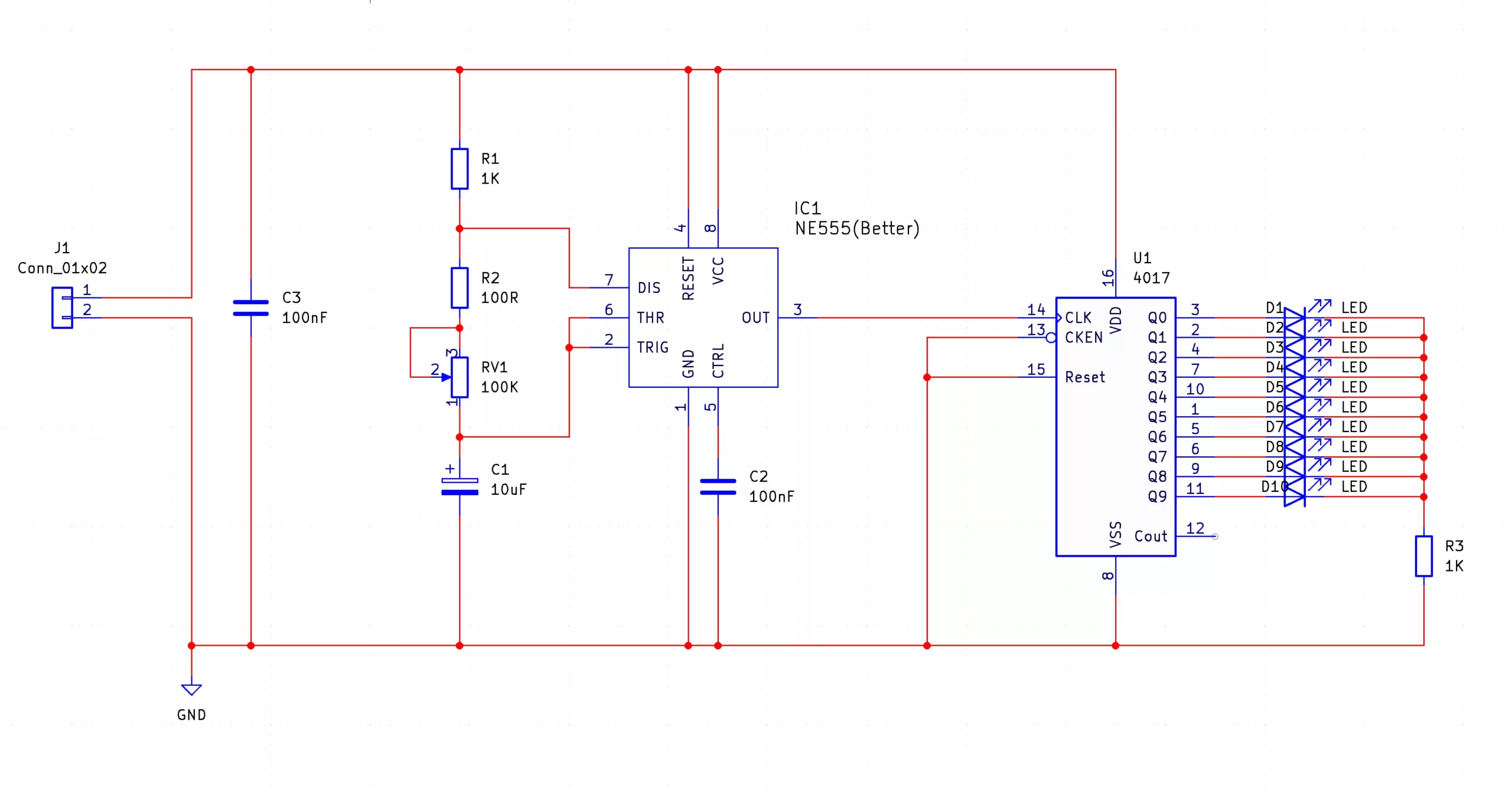
The 4017 light chaser SMD Trainer kit will let you build the famous 4017 light chaser circuit using only SMD parts. Unlike the 555 Astable and Monostable, the 4017 Light Chaser kit integrates both a 555 (as a clock source), and a 4017 Johnson counter that is used to sequentially light up LEDs. The frequency of the 555 astable determines the speed at which the 4017 counts, and the frequency of the 555 astable is determined by the value of the potentiometer RV1 and capacitor (a smaller RV1 and/or C1 results in a faster count). As the aim of this kit is to introduce you to SMD soldering, the theory behind the circuit will not be covered here, but instead can be learned from the MitchElectronics 4017 Light Chaser kit.
What can you do with the 4017 Light Chaser SMD Trainer?
Besides the obvious use of SMD training, the 4017 light chaser can be used in many different projects. One such popular example is cosplay which requires a constant stream of LED light that supposedly moves around the costume. The 4017 Light Chaser is also good for sequential control if used with other circuits with each LED being replaced with a logic circuit.
Another fantastic use of the 4017 light chasers is model RC runways and dioramas. If the LEDs are replaced with cables that go to individual LEDs, it is possible to create a runway whose LED pattern blinks in the direction of plane landings. Finally, the 4017 Light Chaser is one of those projects that is neat to build, and can be a cool gizmo to have blinking away on the desk.
Schematic
Try it yourself
Circuit simulation
What you need
Component List
| Component | Quantity | PCB Reference |
|---|---|---|
| NE555 | 1 | IC1 |
| 4017 | 1 | U1 |
| 100Ω Resistor | 1 | R2 |
| 1KΩ Resistor | 2 | R1, R3 |
| 100KΩ Potentiometer | 1 | RV1 |
| 100nF Capacitor | 2 | C2, C3 |
| 10uF Capacitor | 1 | C1 |
| Red LED | 10 | D1 to D10 |
| PP3 Connector | 1 | J1 (Red Square, Black Circle Pad) |
| 4017 Light Chaser SMD PCB | 1 | — |
Inspect the board
Interactive BOM
Board reference
PCB & assembly
The PCB silkscreen and component references should be checked against the component list before soldering each part.

Before applying power
- Check every component against its PCB reference.
- Confirm the orientation of all polarised components and ICs.
- Inspect for solder bridges, unsoldered pads and clipped leads that could cause a short.
- Check that no loose wire or solder debris remains on the board.
Build with confidence
Construction tips
Recommended build approach
4017 Light Chaser SMD uses surface-mount components, so work methodically and inspect each joint as you go.
- Check the component values and package markings before soldering.
- Start with the smallest passive components and work towards larger devices and connectors.
- For multi-pin devices, align the package carefully and tack one pad first; correct the alignment before soldering the remaining pins.
- Use only enough solder to form a clean joint and watch closely for bridges between adjacent pads.
- Observe the orientation marks on diodes, LEDs, ICs and any other polarised components.
- Inspect the board under good light or magnification before applying power.
SMD soldering guidance
If you are new to surface-mount assembly, use the SMD Soldering Guide alongside these instructions. Keeping the tip clean, using flux where appropriate and checking alignment frequently makes the build much easier.
When it does not work
Troubleshooting
Nothing happens when power is applied
- Confirm the supply is connected to the correct input and with the correct polarity.
- Check that ICs, diodes, LEDs, transistors and electrolytic capacitors are fitted in the correct orientation.
- Compare component values and positions against the component list and PCB reference.
- Inspect for missed joints, dry joints and accidental solder bridges.
- Closely inspect fine-pitch and adjacent SMD pads for solder bridges or unsoldered ends.
The circuit powers up but does not behave as expected
This kit is intended for smd sequential led light chaser trainer. If the output is stuck, unstable or outside the expected behaviour, use the schematic to trace the circuit a stage at a time rather than replacing several parts at once.
Check the components around the part of the circuit responsible for the output or timing first. A misplaced resistor, reversed semiconductor or poor connection can allow a circuit to power up while preventing it from operating correctly.
The circuit works intermittently
Intermittent behaviour is often caused by a marginal solder joint, a loose connector or a component lead that has not been fully soldered. Gently inspect the board with power removed and reflow any joint that looks dull, cracked or incomplete.
If the fault remains, compare the assembled board with the schematic and PCB reference one connection at a time.
Ready to test and experiment?
To help keep the board stable when soldering, you can download a free STL model of a basic jig that can be 3D printed with all common 3D printers. Watch out for the mounting hole pins as they may be vulnerable to snapping if using a low infill density, low wall thickness, or thick layer heights. Additionally, do not use hot air to solder the PCB when using the jig as you will melt the jig. Download 4017 LC SMD STL Holder
Once the board is working, compare its behaviour with the schematic and the explanation above. Try changing only one input, control or permitted component value at a time so you can clearly see what effect that change has on the circuit.